Multi Agent
Overview
Traditionally, evaluation and scanning workflows have assumed that a single conversation trajectory (message list) represents an agent’s activity. However, modern coding agents like Claude Code and Codex CLI create many additional dimensions to consider. Consider this transcript from a Claude Code agent session:
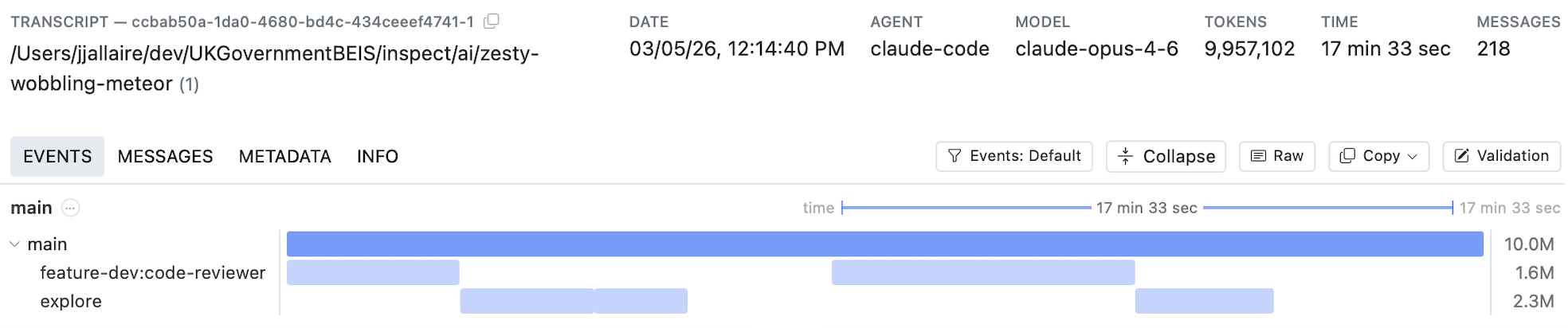
As you can see, multiple sub-agents are created each of which feeds context back into the main agent trajectory. In many cases multiple agents are run in parallel, and compaction will often further divide trajectories into multiple-phases. Further, the total tokens consumed by these agents can often run into the tens of millions, requiring that scanning be chunked into multiple steps.
Example: Claude Code
Below we describe the tools available in Scout to handle multi-agent transcripts. Before reading on, you might find it useful to explore some real multi-agent transcripts to gain intuition about their shape and behavior.
You can import and view your own local Claude Code session transcripts as follows:
mkdir cc-sessions
cd cc-sessions
scout import claude_code --limit 50
scout view
As you’ll see when browsing the transcripts, most Claude Code sessions make use of several sub-agents (often in parallel). You might also see one or more compactions. Below, we’ll describe how you can create scanners that target transcripts like these.
Timelines
A timeline is a hierarchical tree of spans built automatically from transcript events. Each span represents an agent, tool, or scorer invocation, containing events (model calls, tool calls, compaction) with optional child spans.
When you enable timeline=True on a scanner, the timeline is built from the transcript’s events and made available on Transcript.timelines.
Scanning Timelines
The primary use case for timelines is scanning—analyzing each agent’s conversation independently rather than treating the entire transcript as a flat message list.
Opting In
To scan timelines instead of raw messages, set timeline=True on the @scanner decorator:
from inspect_scout import llm_scanner, scanner

@scanner(timeline=True)
def my_scanner():
    return llm_scanner(
        question="Did the agent exhibit any harmful behavior?",
        answer="boolean",
    )
When timeline scanning is enabled, each span in the timeline tree is scanned independently. In terms of the example above, there would be 5 distinct spans scanned: the “main” trajectory as well as the two “explore” and “code-reviewer” sub-agents. Each distinct span (main thread or sub-agent) then yields its own scanning result.
Depth Control
The depth parameter controls how deep into the span tree to scan:
depth |
Behavior |
|---|---|
1 |
Scan only the root span — the top-level agent’s full conversation thread. Treats the timeline like a flat transcript. |
2 |
Scan the root span and its immediate children. Covers the main agent plus its direct sub-agents. |
None (default) |
Scan all levels recursively. Every non-utility span with model events is scanned independently. |
With depth=1 you get a single scan of the entire main conversation thread. With deeper values, each sub-agent’s conversation is scanned separately and results are combined. For example, depth=2 on an agent that delegates to three sub-agents produces up to four independent scans (the root plus each child).
@scanner(timeline=True)
def shallow_scan():
    return llm_scanner(
        question="Was the overall task completed successfully?",
        answer="boolean",
        depth=1,  # scan only the root agent's conversation
    )
Compaction
Long-running agents may have their context window compressed mid-conversation (via summarization or trimming), creating compaction boundaries that divide the conversation into regions. The compaction parameter controls how these boundaries are handled:
compaction |
Behavior |
|---|---|
"all" (default) |
Merge messages across compaction boundaries, reconstructing the full conversation. The scanner sees everything. |
"last" |
Scan only the final region after the last compaction. Useful when you only care about recent behavior or when earlier context is too noisy. |
N (int) |
Keep the last N compaction regions. 1 is equivalent to "last". |
@scanner(timeline=True)
def recent_behavior():
    return llm_scanner(
        question="Did the agent make any errors in its recent actions?",
        answer="boolean",
        compaction="last",  # scan only the most recent region
    )
Context Chunking
When a span’s messages (after compaction processing) exceed the scanning model’s context window, they are automatically split into segments sized to fit within 80% of the model’s available context. Each segment is scanned independently with the same prompt. Use the context_window parameter to override the model’s detected context window size.
Because context-window segmentation can produce multiple results from a single span, those per-segment results are combined using a reducer. The default reducer is selected based on the answer type:
| Answer Type | Default Reducer |
|---|---|
"boolean" |
ResultReducer.any |
"numeric" |
ResultReducer.mean |
"string" |
ResultReducer.llm() |
| labels | ResultReducer.majority |
| AnswerMultiLabel | ResultReducer.union |
| AnswerStructured | ResultReducer.last |
Override with the reducer parameter:
from inspect_scout import ResultReducer, llm_scanner, scanner

@scanner(timeline=True)
def synthesized_analysis():
    return llm_scanner(
        question="Summarize the agent's key decisions.",
        answer="string",
        reducer=ResultReducer.llm(model="openai/gpt-5"),
    )
Built-in reducers include ResultReducer.any, .mean, .median, .mode, .max, .min, .union, .majority, .last.
Note that reduction applies only within a single span when context-window segmentation is needed. When scanning multiple spans (depth > 1), each span produces its own result independently, and these are collected into a ResultSet — no reduction occurs across spans.
Utility Spans
Single-turn helper agents with different system prompts (e.g., a bash command checker or title-generation helper) are automatically classified as utility spans and excluded from scanning. This ensures scanning focuses on substantive agent interactions rather than mechanical helpers.
Custom Scanners
The examples above all use the high-level llm_scanner(), customizing its behavior with the depth, compaction, and reducer options.
You might however want to build a fully custom scanner for multi-agent transcripts—you can do this by using the lower level Scanner Tools employed by llm_scanner(). These tools include:
Message Extraction—Extracting message lists for scanning from timelines.
Message Presentation—Number messages for presentation to the model and then automatically create message citations from model output.
Prompt Construction—Create prompts that include numbered messages and formatting various types of answers (boolean, multi-lable, structured, etc.)
Answer Generation and Parsing—Executing LLM generations and parsing the answer into a Result including citations for messages.
See the article on Scanner Tools for details on using these tools in custom scanners.
Timeline Data Model
Typically you can rely on automatic timeline construction from transcripts as most agent frameworks and coding agents annotate their event streams with agent spans that enable automatic detection. However, you may also wish to manually construct timelines from custom data sources—this section provides details on how to do this.
Building a Timeline
Call timeline_build(events) to convert a flat event list into a hierarchical timeline. In a scanner context, timelines are built automatically when timeline=True — you rarely need to call it directly. The builder detects top-level phases (init → solvers → scorers), agent spans (both explicit and tool-spawned) and utility agents (single-turn helpers with different system prompts).
Timeline Data Types
The timeline is composed of four types that form a recursive tree:
Timeline
The root container for a timeline view.
| Field | Type | Description |
|---|---|---|
name |
str |
Name of the timeline view |
description |
str |
Description of the timeline |
root |
TimelineSpan | Root span containing all content |
TimelineSpan
An execution span representing an agent, tool, scorer, or other invocation.
| Field | Type | Description |
|---|---|---|
id |
str |
Unique identifier |
name |
str |
Display name of the span |
span_type |
str | None |
"agent", "tool", "scorers", or None |
content |
list[TimelineEvent | TimelineSpan] |
Child events and spans |
branches |
list[TimelineBranch] |
Discarded alternative paths |
utility |
bool |
Whether this is a utility span (excluded from scanning) |
description |
str | None |
Optional description |
agent_result |
str | None |
The agent’s result, if this span represents an agent |
outline |
Outline | None |
Hierarchical outline of events within the span |
Properties: start_time, end_time, total_tokens.
TimelineEvent
Wraps a single Event from the transcript.
| Field | Type | Description |
|---|---|---|
event |
Event |
The wrapped event (e.g., ModelEvent, ToolEvent) |
Properties: start_time, end_time, total_tokens.
TimelineBranch
A discarded alternative path from a branch point (re-rolled attempt).
| Field | Type | Description |
|---|---|---|
forked_at |
str |
ID of the event where the branch diverged |
content |
list[TimelineEvent | TimelineSpan] |
Events and spans in the discarded path |
Properties: start_time, end_time, total_tokens.
Nesting Structure
The tree nests as: Timeline → root TimelineSpan → content (a mix of TimelineEvent and child TimelineSpan nodes). Each span can also have branches containing TimelineBranch objects that capture discarded retries.
Filtering Timelines
Use timeline_filter() to create a new timeline containing only spans that match a predicate:
from inspect_ai.event import timeline_build, timeline_filter

timeline = timeline_build(events)

# Keep only agent spans
agents_only = timeline_filter(timeline, lambda s: s.span_type == "agent")

# Exclude scorer spans
no_scorers = timeline_filter(timeline, lambda s: s.span_type != "scorers")

# Exclude utility agents (single-turn helpers)
no_utility = timeline_filter(timeline, lambda s: not s.utility)
The filter recursively walks the span tree, pruning non-matching spans and their subtrees. TimelineEvent items are always kept (they belong to the parent span). This is useful for pre-filtering a timeline before programmatic analysis.