Projects
Overview
In some cases you’ll prefer to define your transcript source and filters, scanning model, and other configuration once for a project rather than each time you run scout scan. You can do this with a scout.yaml project file.
For example, if we have this project file in our working directory:
scout.yaml
transcripts: s3://weave-rollouts/
filter:
  - task_set='cybench'
model: openai/gpt-5
Then we can run a scan with simply:
scout scan scanner.py Note that the filter field contains one or more SQL WHERE clauses that address fields in the transcript database.
You can also define the location of scanning results and other configuration in project files. For example:
scout.yaml
transcripts: s3://weave-rollouts/
filter:
  - task_set='cybench'
scans: ./cybench-scans

max_processes: 4

model: openai/gpt-5
generate_config:
   temperature: 0.0
   reasoning_effort: minimal
   max_connections: 50

tags: [ctf, cybench]
Note that the filter will constrain any scan done within the project (i.e. filters applied to individual scans will be AND combined with this filter).
Note that scout.yaml project files are intended to be checked in to version control so do not contain secrets. See the section below on using environment files for details on handling secrets.
Scout View
When you run scout view from a project directory it uses the project settings to initialize the Transcripts and Results panes. You can also edit the project settings by clicking on the Project button at the top right:
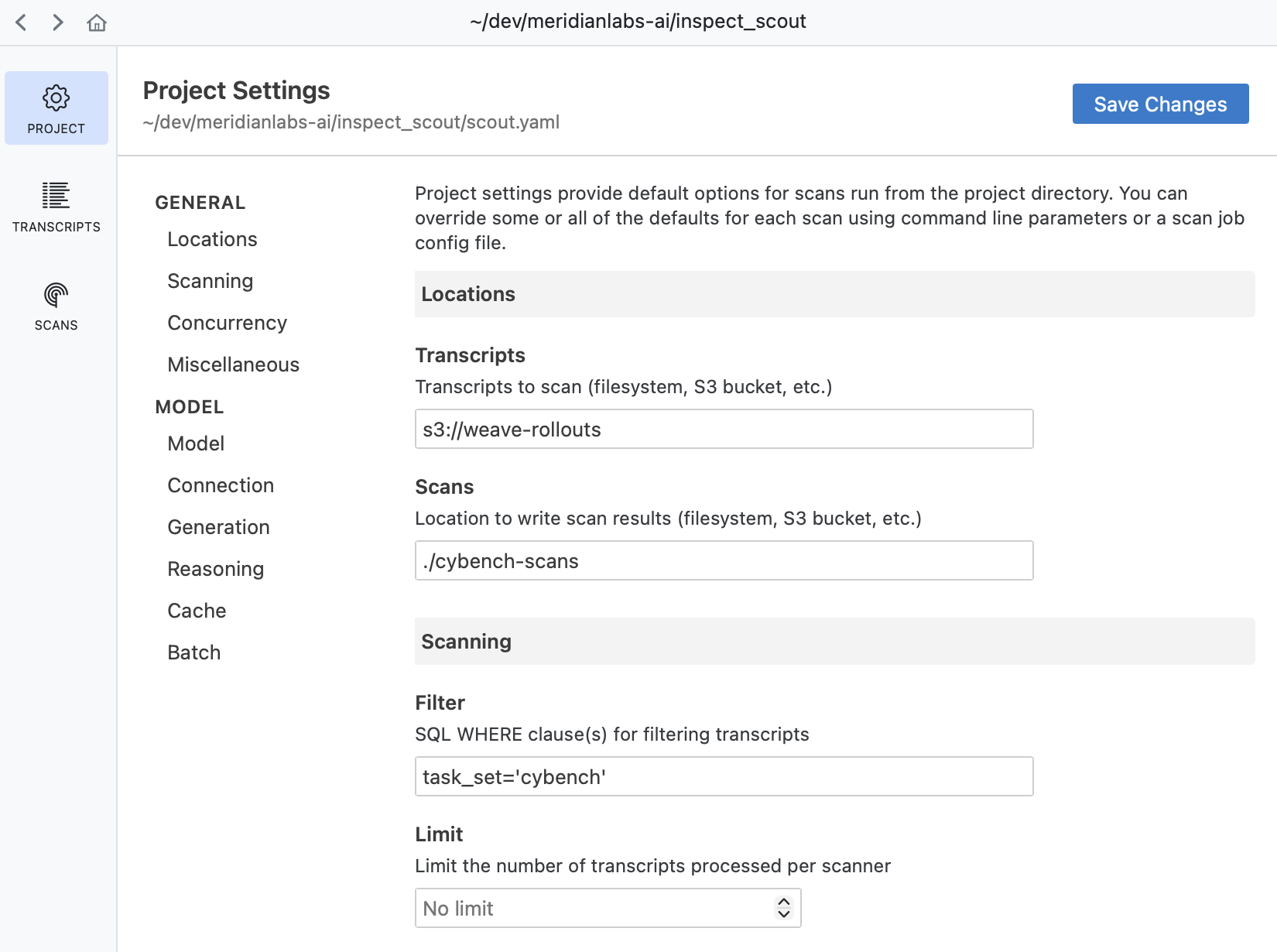
Project Settings
Project files support all of the same options available to scan jobs. The table below describes the available configuration fields:
| Field | Type | Description |
|---|---|---|
name |
str | Project name (defaults to directory name). |
transcripts |
str | Transcript source: local path, S3 URL, or list of sources. |
filter |
str | list | SQL WHERE clauses that filter based on fields in the transcript database. This will constrain any scan done within the project (i.e. filters applied to individual scans will be AND combined with this filter). |
scans |
str | Location for scan results (defaults to ./scans). |
model |
str | Model for scanning (e.g., openai/gpt-5). |
model_base_url |
str | Base URL for model API. |
model_args |
dict | str | Model creation args as a dictionary or path to JSON/YAML file. |
generate_config |
dict | Generation config (e.g., temperature) |
model_roles |
dict | Named model roles for use with get_model(). |
max_transcripts |
int | Maximum concurrent transcripts to process (defaults to 25). |
max_processes |
int | Maximum concurrent processes for multiprocessing (defaults to 4). |
limit |
int | Limit the number of transcripts processed. |
shuffle |
bool | int | Shuffle transcript order. Pass an int to set a random seed. |
tags |
list | Tags to associate with scans (e.g., [ctf, cybench]). |
metadata |
dict | Arbitrary metadata to associate with scans. |
log_level |
str | Console log level (defaults to warning). |
scanners |
list | dict | Scanner specifications to include in all scans. |
worklist |
list | Transcript IDs to process for each scanner. |
validation |
dict | Validation sets to apply for specific scanners. |
Local Config
In some cases you might want to provide local overrides to a shared project configuration file. You can do this by adding a scout.local.yaml file alongside your scout.yaml file. For example, here we override the main project file with a different model, max connections, and log level:
scout.local.yaml
model: openai/gpt-5-mini
generate_config:
   max_connections: 100
log_level: info
Be sure to add scout.local.yaml to your .gitignore so it isn’t checked in to version control.
Environment (.env)
While scout.yaml project files are intended to be checked into version control, you’ll often have secrets and credentials that should not be committed. Use a .env file for these values.
Common secrets to store in .env:
- API keys:
OPENAI_API_KEY,ANTHROPIC_API_KEY, etc. - Access tokens:
HF_TOKENfor Hugging Face datasets and models. - Cloud credentials: AWS credentials for S3 access
When you run scout scan or other Scout commands, the .env file in your working directory (or any parent directory) is automatically loaded. For example:
.env
OPENAI_API_KEY=sk-...
ANTHROPIC_API_KEY=sk-ant-...
AWS_ACCESS_KEY_ID=AKIA...
AWS_SECRET_ACCESS_KEY=...
Be sure to add .env to your .gitignore file to prevent accidentally committing secrets.
See the Inspect AI documentation on environment files for additional details on .env file handling
Scan Jobs
Projects share all configuration fields with scan jobs. When you run a scan, the project configuration is automatically merged with the scan job (whether defined in code via @scanjob or in a YAML/JSON config file).
The merge follows these rules:
For simple fields like
scans,model,max_transcripts, etc., the project value is used only when the scan job doesn’t specify a value.The input transcripts (
transcripts,filter) are treated as an atomic unit. A scan job can fully override project transcripts but not e.g. add clauses to thefilter.The model configuration (
model,model_base_url,model_args,generate_config) are also treated as an atomic unit. If the scan job specifies a model, all model-related configuration comes from the scan job. Otherwise, all model configuration comes from the project.For collection fields like
tags,metadata,scanners,worklist, andvalidation, values from both the project and scan job are combined. If there are key conflicts, the scan job value takes precedence.
For example, given this project:
scout.yaml
transcripts: s3://weave-rollouts/cybench
model: openai/gpt-5
tags: [production]
And this scan job:
scan.yaml
scanners:
  - file: scanner.py
tags: [safety-audit]
The effective configuration will use transcripts and model from the project, scanners from the scan job, and the merged tags [production, safety-audit].
Default Project
When you run scout scan or other Scout commands, the system automatically searches for a scout.yaml project file wihtin the current working directory.
If no project file is found, Scout uses the following defaults:
name: Project directory nametranscripts:./transcripts(if that directory exists) or./logs(if that directory exists)scans:./scans