Inspect Flow
Introduction
Inspect Flow is a workflow orchestration tool for Inspect AI that enables you to define, run, and manage evaluations at scale — from configuration through to production.
Why Inspect Flow? As evaluation workflows grow in complexity—running multiple tasks across different models with varying parameters, then reviewing, validating, and promoting results—managing these experiments becomes challenging. Inspect Flow addresses this by providing:
- Declarative Configuration: Define complex evaluations with tasks, models, and parameters in type-safe schemas
- Global Log Reuse: Flow Store indexes evaluation logs and enables cross-directory reuse, so you only run what’s new or changed
- Powerful Defaults: Define defaults once and reuse them everywhere with automatic inheritance
- Parameter Sweeping: Matrix patterns for systematic exploration across tasks, models, and hyperparameters
- Post-Evaluation Workflows: Tag, validate, and promote evaluation logs with composable steps
Inspect Flow is designed for researchers and engineers running systematic AI evaluations who need to scale beyond ad-hoc scripts.
Getting Started
Before using Inspect Flow, you should:
- Have familiarity with Inspect AI
- Have an existing Inspect evaluation or use one from inspect-evals
Installation
Install the inspect-flow package from PyPI as follows:
pip install inspect-flowSet up API keys
You’ll need API keys for the model providers you want to use. Set the relevant provider API key in your .env file or export it in your shell:
export OPENAI_API_KEY=your-openai-api-keyexport ANTHROPIC_API_KEY=your-anthropic-api-keyexport GOOGLE_API_KEY=your-google-api-keyexport GROK_API_KEY=your-grok-api-keyexport MISTRAL_API_KEY=your-mistral-api-keyexport HF_TOKEN=your-hf-tokenOptional: VS Code extension
Optionally install the Inspect AI VS Code Extension which includes features for viewing evaluation log files.
Basic Example
Let’s walk through creating your first Flow configuration. We’ll use FlowSpec (the entrypoint class) and FlowTask to define evaluations.
- FlowSpec — Pydantic class that encapsulates the declarative description of a Flow spec.
- FlowTask — Pydantic class abstraction on top of Inspect AI Task.
- FlowModel — Pydantic class abstraction on top of Inspect AI Model.
- tasks_matrix() — Helper function for parameter sweeping to generate a list of tasks with all parameter combinations.
- models_matrix() — Helper function for parameter sweeping to generate a list of models with all parameter combinations.
- configs_matrix() — Helper function for parameter sweeping to generate a list of GenerateConfig with all parameter combinations.
FlowSpec is the main entrypoint for defining evaluation runs. At its core, it takes a list of tasks to run. Here’s a simple example that runs two evaluations:
config.py
from inspect_flow import FlowSpec, FlowTask

FlowSpec(
    log_dir="logs",
    tasks=[
        FlowTask(
            name="inspect_evals/gpqa_diamond",
            model="openai/gpt-4o",
        ),
        FlowTask(
            name="inspect_evals/mmlu_0_shot",
            model="openai/gpt-4o",
        ),
    ],
)
To run the evaluations, execute the following command. Make sure you have the necessary dependencies installed (like inspect-evals and openai for this example).
flow run config.pyBoth tasks will run with progress displayed in your terminal.

Python API
You can run evaluations from Python instead of the command line by calling the run() function with a FlowSpec.
config.py
from inspect_flow import FlowSpec, FlowTask
from inspect_flow.api import run

spec = FlowSpec(
    log_dir="logs",
    tasks=[
        FlowTask(
            name="inspect_evals/gpqa_diamond",
            model="openai/gpt-4o",
        ),
        FlowTask(
            name="inspect_evals/mmlu_0_shot",
            model="openai/gpt-4o",
        ),
    ],
)
result = run(spec=spec)
print(f"Success: {result.success}, logs written to {result.log_dir}")
Matrix Functions
Often you’ll want to evaluate multiple tasks across multiple models. Rather than manually defining every combination, use tasks_matrix to generate all task-model pairs:
matrix.py
from inspect_flow import FlowSpec, tasks_matrix

FlowSpec(
    log_dir="logs",
    tasks=tasks_matrix(
        task=[
            "inspect_evals/gpqa_diamond",
            "inspect_evals/mmlu_0_shot",
        ],
        model=[
            "openai/gpt-5",
            "openai/gpt-5-mini",
        ],
    ),
)
To preview the expanded config before running it, you can run the following command in your shell to ensure the generated config is the one that you intend to run.
flow config matrix.pyThis command outputs the expanded configuration showing all 4 task-model combinations (2 tasks × 2 models).
matrix.yml
log_dir: logs
tasks:
- name: inspect_evals/gpqa_diamond
  model: openai/gpt-5
- name: inspect_evals/gpqa_diamond
  model: openai/gpt-5-mini
- name: inspect_evals/mmlu_0_shot
  model: openai/gpt-5
- name: inspect_evals/mmlu_0_shot
  model: openai/gpt-5-mini
Flow provides additional matrix functions (models_matrix, configs_matrix) for sweeping over model settings, generation configs, and more. See Matrixing for details.
Run Evaluations
Before running evaluations, preview what would run with --dry-run:
flow run matrix.py --dry-runThis performs the full setup process—importing tasks from the registry, applying all defaults, expanding all matrix functions, and checking for existing logs—showing exactly what would run, but stops before actually running the evaluations.
To run the config:
flow run matrix.pyWhen complete, you’ll find a link to the logs at the bottom of the task results summary.
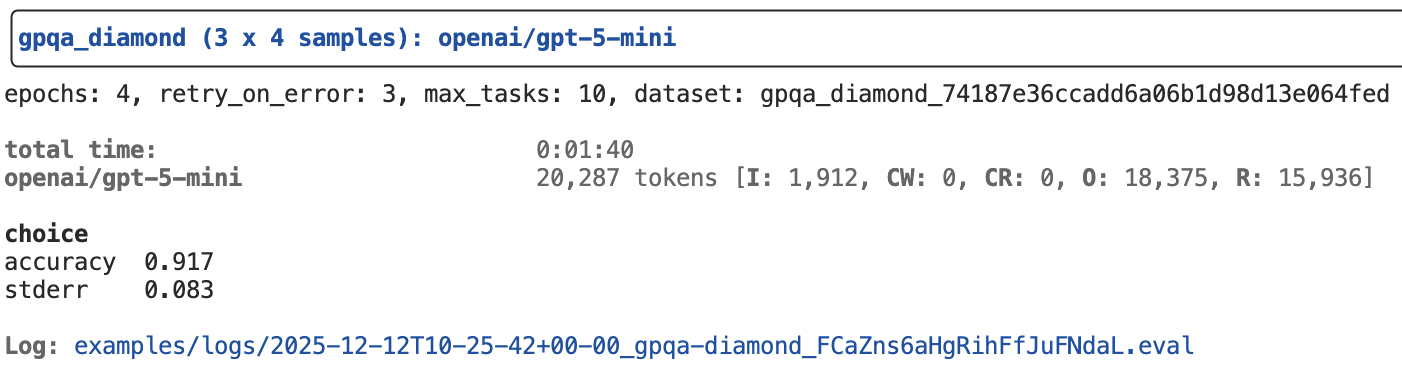
To view logs interactively, run:
inspect view --log-dir logs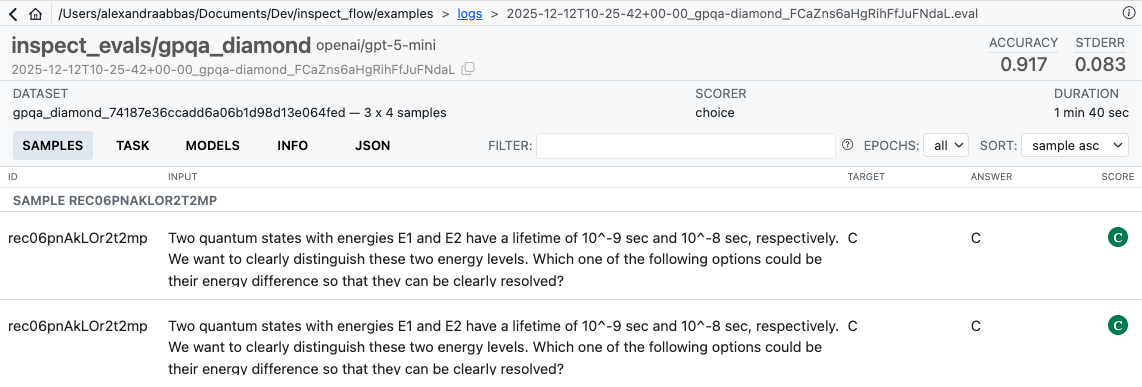
After Running
Once evaluations complete, use steps to operate on the resulting logs. For example, tag logs after reviewing them:
flow step tag logs/ --add reviewed --reason "Manually inspected"Use flow check to verify the completeness of a spec against a log directory — for example, checking how much of a production directory has been filled:
flow check matrix.py --log-dir s3://bucket/prod/logsSteps can be composed into full workflows — filtering, tagging, and copying logs between directories. See Steps for custom steps, filters, and an end-to-end example.
Learning More
See the following articles to learn more about using Flow:
- Spec: Flow type system, config structure and basics.
- Flow Store: How Flow indexes evaluation logs and enables cross-directory reuse across runs.
- Defaults: Define defaults once and reuse them everywhere with automatic inheritance.
- Matrixing: Systematic parameter exploration with matrix and with functions.
- Steps: Post-evaluation workflows — tag, validate, and promote logs with composable steps.
- Reference: Detailed documentation on the Flow Python API and CLI commands.