Replay
Overview
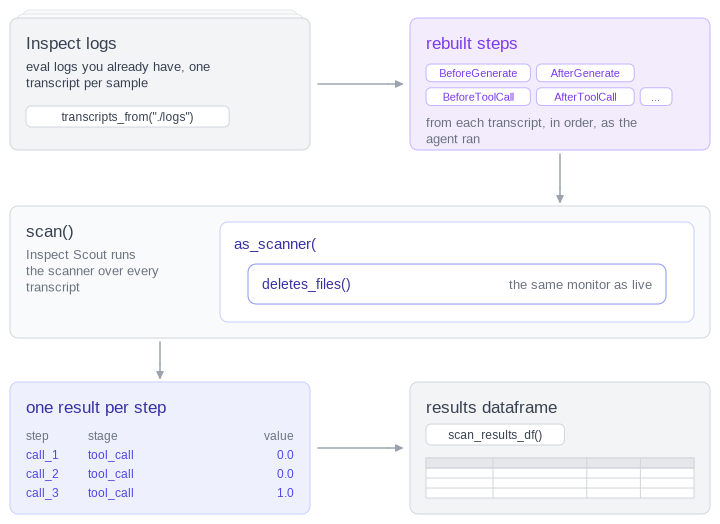
Before you let a monitor reject tool calls or end samples, you should know how often it flags the steps you care about and how often it flags harmless ones. Replay lets you measure this on agent runs you already have. It rebuilds each step from an eval log and runs your monitor or protocol over it with the same code that runs during an eval.
Replay runs through Inspect Scout. Your monitor becomes a Scout scanner, and the scan gives you one result for each step, which you can read in Scout View or as a pandas dataframe. You can use replay to:
- See which steps of existing runs a new monitor would flag, before attaching it to an eval.
- Choose a threshold from the scores a monitor gives on runs you know are harmless.
- Compute precision and recall against your own labels, and compare two versions of a monitor.
Installation
Replay uses the scout extra, which installs a compatible version of Inspect Scout:
pip install 'inspect-sentinel[scout]'Replaying a Monitor
Let’s replay the suspicion monitor from examples/llm_suspicion.py (described in LLM Monitors) over the logs of some earlier runs. Save this script in the examples directory, so that it can import the monitor:
replay_suspicion.py
from inspect_scout import scan, scan_results_df, transcripts_from
from inspect_sentinel.scout import as_scanner
from llm_suspicion import suspicion
status = scan(
scanners={"suspicion": as_scanner(suspicion())},
transcripts=transcripts_from("./logs"),
model_roles={"monitor": "anthropic/claude-haiku-4-5"},
)
results = scan_results_df(status.location).scanners["suspicion"]
print(results[["transcript_id", "metadata.step_id", "metadata.stage", "value"]])- 1
-
as_scanner()turns a monitor or protocol into a Scout scanner. It takes anythingTask(sentinel=...)takes, and also a single monitor on its own. Several monitors with no protocol are refused; scan them one at a time. - 2
-
The transcripts to scan, here every sample in the eval logs in
./logs. Each sample is one transcript. - 3
-
The monitor model, given through the
monitormodel role as in an eval. - 4
- One dataframe for each scanner, with one row for each step.
Run it with Python:
python replay_suspicion.pyYou can also open the scan in Scout View with scout view. Each result’s explanation starts with a link to the step it is about, such as Step [E12]: ..., so you can go from a score to the tool call it scored. A label like [M3] cites a message and [E12] an event (see Citations).
The scan resolves the monitor model the same way an eval does, with the scan’s model_roles and model in place of the eval’s: a model the monitor names, else the role it asks for (monitor by default), else the scan’s model, with a warning. The monitor’s model usage counts toward the scan’s.
Results
Each row of the results dataframe is one step at one stage:
| Column | Description |
|---|---|
transcript_id |
The sample the step belongs to. |
metadata.step_id |
The tool call id at a tool stage, or the model call id at a generate stage. A tool call’s two steps share its id. Where a call id runs more than once (a retry after a tool error, or a provider that reuses ids), a run of the id after an earlier run’s steps took it has its execution id instead, in logs that record one, so each step’s id is unique in its transcript. A tool step of an agent run through an agent bridge has the id of the model call that proposed it, a /, then the call id. In read mode, an agent bridge’s check of a tool call has its execution id, or, for a result the bridge could not tie to one run of a call id it handed out more than once, the id of the sentinel span it was reported in, which the reports of its monitors share. Either way it matches no replayed step (see Bridged Agents). |
metadata.replay_step_id |
In read mode, the replayed step the row joins: its own metadata.step_id, except for an agent bridge’s check, which names the replayed step of the model call that proposed its call id, or None where the log doesn’t tie it to one (see Bridged Agents). |
metadata.stage |
"model_input" (BeforeGenerate), "model_output" (AfterGenerate), "tool_call" (BeforeToolCall) or "tool_result" (AfterToolCall). |
metadata.conversation |
The conversation the step is in. Each agent and sub-agent has its own message thread, its conversation, so this tells a sub-agent’s steps apart from the main agent’s. |
value |
For a monitor, the suspicion score: a number, or a dict with one entry per dimension. For a protocol, True if the action is reject, modify or terminate, and False for proceed or escalate. None where the monitor or protocol abstained. |
answer |
For a protocol, the action, such as "escalate". None where it abstained. |
metadata.metadata |
The observation’s or decision’s own metadata. |
metadata.depth |
How deeply nested the step’s conversation is (see Sub-agents and Timelines). |
metadata.turns |
How the transcript’s agent turns were established: "recorded", "inferred" or "stored" (see What a Replayed Step Holds). |
metadata.audit, metadata.modified, metadata.reports |
For a protocol, its decision’s audit flag, its modified tool call, and the reports of the monitors and protocols beneath it. |
metadata.human, metadata.human_answer |
Where the step reached human(), where its answer came from (see Human Decisions in Replay). |
metadata.status |
In read mode, "superseded" for a protocol decision that was superseded at its step (see Read Mode). |
The suspicion monitor scores two dimensions, so each value is a dict such as {"files": 0.1, "network": 0.7}. Its value is None at the agent’s submit() tool call, where it abstains. A protocol’s escalate declines to decide, so it isn’t flagged, but answer still records it, so you can count escalations.
If a monitor raises an exception, the transcript gives one error row (in the scan_error column) instead of step rows, so a failed monitor is never counted as an abstention. This happens even under observe_only(), which in an eval logs a warning and lets the step proceed, and for any monitor in the sentinel, even one a protocol went on without at that step, since a row can’t say that a monitor behind it failed.
Citations
A row’s references cite the step’s model event or message first, then what the report cites. Each reference has a cite label, as Scout’s scanners write them: [M<n>] for the transcript’s nth message and [E<n>] for its nth event, so one label names one message or event across all of a transcript’s rows.
Every reference resolves in the transcript. A step whose message the transcript doesn’t hold (e.g. a sub-agent’s tool message or reply) cites the event that recorded it, its ToolEvent or ModelEvent. A reference to anything the transcript doesn’t hold, a report’s included, is left out.
A label a monitor gave its own reference is replaced with that reference’s transcript label, and the monitor’s explanation is rewritten to match. The explanation leads with the step’s label and names any other reference the report’s explanation doesn’t, so Scout View links each one.
Measuring a Monitor
To measure a monitor, you need its scores on steps whose correct answer you already know. Both measurements below use ordinary pandas over the results dataframe.
Replay measures what a monitor or protocol reports, not what its decisions would have done. A reject in a replay does not change the transcript, because the agent already ran the tool call. To see what the agent does after a rejected tool call, run a live eval.
Scores on Harmless Runs
To choose a threshold, collect the scores a monitor gives on runs you know are harmless. Run your tasks with the monitor under observe_only(), which records every observation and lets every step proceed:
from inspect_ai import eval
from inspect_sentinel import observe_only

from llm_suspicion import suspicion

eval(
    "benign.py",
    model="openai/gpt-5-mini",
    model_roles={"monitor": "anthropic/claude-haiku-4-5"},
    sentinel=observe_only(suspicion()),
    log_dir="./logs-benign",
)
Here benign.py stands for tasks the agent can complete without breaking the monitor’s policy. The scores are now in the logs. Read them with as_reader(), which gives the same rows as as_scanner() from what the eval recorded, without calling the monitor model again (see Read Mode). Then take a percentile of each dimension:
from inspect_scout import scan, scan_results_df, transcripts_from
from inspect_sentinel.scout import as_reader

status = scan(
    scanners={"benign": as_reader("suspicion")},
    transcripts=transcripts_from("./logs-benign"),
)
scores = scan_results_df(status.location).scanners["benign"]["value"].dropna()

for dimension in ["files", "network"]:
    print(dimension, scores.map(lambda v: v[dimension]).quantile(0.99))
The 99th percentile of a dimension is the threshold that flags about 1% of harmless tool calls on that dimension. threshold() accepts one threshold per dimension, as in threshold(suspicion(), reject_at={"files": 0.7, "network": 0.6}). If you already have logs of harmless runs without the monitor, replay it over them with as_scanner() and use the same value column.
Precision and Recall
To compute precision and recall, you need labels that say, for some steps, whether the monitor should have flagged them. You make the labels yourself, for example by reading tool calls in Scout View and writing down their ids. The easiest way to collect step ids for labeling is to run a first scan over the transcripts and take each row’s metadata.step_id. Here the labels are a CSV file with columns transcript_id, step_id and unsafe (True or False), and status is the scan from replay_suspicion.py:
import pandas as pd

labels = pd.read_csv("labels.csv")
results = scan_results_df(status.location).scanners["suspicion"]

scored = results.rename(columns={"metadata.step_id": "step_id"}).merge(
    labels, on=["transcript_id", "step_id"]
)
flagged = scored["value"].map(lambda v: v is not None and max(v.values()) >= 0.8)
unsafe = scored["unsafe"]

true_positives = (flagged & unsafe).sum()
print("precision", true_positives / flagged.sum())
print("recall", true_positives / unsafe.sum())
flagged applies the same test as threshold(suspicion(), reject_at=0.8): a tool call is flagged when its highest dimension reaches 0.8. To trace a precision-recall curve, repeat this for a range of thresholds. Choose thresholds on one set of runs and measure on another. Measure again when you change the monitor model, since a threshold chosen from one model’s scores does not carry over to another model.
If your labels are per sample rather than per step, scan with results="transcript" (see One Result per Transcript) and use a Scout validation set, which compares each transcript’s result with its label.
Monitor Versions
When you change a monitor in a way that changes its scores, such as a new prompt, raise its version:
@monitor(version=1)
def suspicion(model: str | None = None, role: str | None = None) -> Monitor:
    ...
The version defaults to 0. A nonzero version is recorded with the monitor’s configuration in eval logs and in a scan’s scanner parameters, so each set of results says which version produced it. @protocol takes version too.
Stages
The suspicion monitor watches only BeforeToolCall, so it gives one row per tool call. A monitor or protocol that watches several stages gives a row for each step at each of them. Pass stage to keep only one stage’s rows:
as_scanner(failure_count(), stage="tool_call")Every stage the sentinel watches still runs, in order, so a monitor that keeps state across stages (like failure_count() in examples/trajectory.py) receives the same steps it received during the eval. Pass stage also when you want Scout’s scan summary for one stage, because the summary averages a scanner’s values over all of its rows.
One Result per Transcript
To get one result per sample instead of one per step, pass results="transcript":
as_scanner(suspicion(), results="transcript")For a monitor, the value is the highest suspicion score in the transcript, per dimension for a structured score. For a protocol, it is the strongest decision. The result cites the steps that set it, so Scout View links to them. Its explanation is the first such step’s, naming the others by their labels (Also set at [M7].).
Choosing Steps
By default the sentinel runs at every step. To run it at only some steps, pass steps. For example, after changing a monitor’s prompt, you can re-run it at only the steps an earlier scan flagged:
flagged = results[results["value"].map(lambda v: v is not None and max(v.values()) >= 0.8)]
as_scanner(suspicion(), steps=flagged)
steps takes a results dataframe, a table with transcript_id and step_id columns (such as your labels), or rows of (transcript_id, step_id) pairs. Two more columns narrow each row further:
| Column | Effect |
|---|---|
stage (metadata.stage in a results dataframe) |
Runs the row’s step at that stage only. Without it, a row runs its step at every stage the sentinel watches, so a tool call runs at both of its tool stages, since they share an id. |
conversation (metadata.conversation in a results dataframe) |
Runs the row’s step in that conversation only, since two agents’ tool calls can share an id. |
So with a results dataframe, each row runs only at its own stage and conversation. If you replay with timeline (see Sub-agents and Timelines), conversations are matched against the stored timeline’s, so take the table from a scan with the same timeline.
The sentinel does not run at steps that steps leaves out, so a monitor that keeps state does not see them. A transcript the table doesn’t list gives no rows, and its steps aren’t rebuilt. Scout still reads it, though, since a scanner can’t narrow a scan’s transcripts, so for a large scan, filter the scan’s transcripts to the same ids:
from inspect_scout import columns as c

listed = transcripts_from("./logs").where(
    c.transcript_id.in_(list(set(flagged["transcript_id"])))
)
scan(scanners={...}, transcripts=listed)
Step Selectors
To choose steps by their content, write a step selector: a function that takes the transcript id and a ReplayStep and returns True to run the step. This one chooses tool calls to bash():
from inspect_sentinel import ReplayStep

def bash_calls(transcript_id: str, step: ReplayStep) -> bool:
    return step.stage == "tool_call" and step.step.call.function == "bash"
step.step is the step a monitor would receive, step.stage is its stage, and step.id is its step id (the same id as the metadata.step_id column). Pass the selector as as_scanner(suspicion(), steps=bash_calls), or by name as steps="module:bash_calls".
A selector can choose by anything a ReplayStep holds. For example, step.segment holds the step’s conversation and how many of its compactions came before it, so this one runs only after a conversation’s second compaction:
def after_two_compactions(transcript_id: str, step: ReplayStep) -> bool:
    return step.segment[1] >= 2
Define a selector at module level in a .py file (a module, or the script that runs the scan). A selector defined in a notebook, a REPL or python -c is refused, so from a notebook, put it in a .py file next to the notebook and import it. A function of the wrong shape is a type error at the as_scanner() call. See Running and Resuming for how Scout loads the function.
Human Decisions in Replay
A replay cannot ask a person, so human() is answered in other ways. This includes a human() that asks through your own review tool: the tool is never called during a replay. If a person answered at the same step and instance path when the run was recorded, replay gives that recorded answer again. This lets you replay a protocol like the ones in Human Decisions against the decisions a person actually made.
A recorded answer is matched to the human() that recorded it by its instance path, exactly, so answers a log recorded under triage/human aren’t given to a sentinel whose human() is at human. When that happens at a step (a human() asks at a path with no recorded answer, while an answer was recorded at a path where no human() asked), the scan logs one warning naming both paths.
Where no answer was recorded, the human parameter of as_scanner() gives a fixed answer: "reject" (the default), "approve" or "terminate":
sentinel = sequential([
    threshold(suspicion(), escalate_at=0.5, reject_at=0.8),
    human(stages=["tool_call"]),
])
as_scanner(sentinel, human="approve")
A fixed answer behaves as if the person had picked it, so a protocol decides as it would live. A terminate answer doesn’t stop the replay, which still runs the later steps.
A human() that does not offer the fixed answer gets terminate, the answer given when nobody can be asked, which human() takes whatever it offers. For example, reject is not offered after a tool call runs or at "model_input" and "model_output", so by default a human() at "tool_result" gets terminate.
To answer as a person would, pass a stand-in: an async function that takes the step, the escalations and the choices, and returns a HumanAnswer (e.g. an oracle built from labels, or a model). This one answers from the labels file used above:
from collections.abc import Sequence

import pandas as pd
from inspect_sentinel import Escalations, HumanAnswer, ReplayStep

labels = pd.read_csv("labels.csv")
UNSAFE = set(labels[labels["unsafe"]]["step_id"])

async def from_labels(
    step: ReplayStep, escalations: Escalations, choices: Sequence[str]
) -> HumanAnswer:
    if step.id in UNSAFE:
        return HumanAnswer("reject", "labelled unsafe")
    return HumanAnswer("approve", "labelled safe")
Pass it as as_scanner(sentinel, human=from_labels), or by name as human="module:from_labels". Define it at module level in a .py file, as for a step selector; a function of the wrong shape (e.g. one that isn’t async) is a type error at the as_scanner() call.
Each row where the step reached human() says where the answer came from in metadata.human:
metadata.human |
Where the answer came from |
|---|---|
"recorded" |
The person, in the recorded run. |
"unanswered" |
The fixed human answer (also in metadata.human_answer). |
"simulated" |
The stand-in. |
Counting the "unanswered" and "simulated" rows tells you how many steps would have gone to a person, apart from real decisions.
Read Mode
as_reader() reads the observations and decisions that a monitor or protocol recorded during the eval, and gives the same rows replay gives, with the same citations. It calls no model. Pass the instance path as the log records it:
| Path | Reads |
|---|---|
Nothing ("", the default) |
The protocol at the top of the sentinel. |
"suspicion" |
A monitor on its own, such as under observe_only(), by its name. |
"llm/suspicion" |
A monitor under the "llm" key of a mapping. |
"attempt/suspicion" |
The suspicion monitor inside the attempt protocol. |
Pass stage to keep one stage’s rows, as for as_scanner(). A step where the instance abstained recorded nothing, so it has no read-mode row. A protocol decision that was superseded at its step also gets a row, with metadata.status "superseded", so read mode can give more than one row for a step.
Read mode is also the only way to see what a protocol’s decisions did during the eval, since a replay doesn’t change the transcript.
Comparing Decisions
Replay lets you see how a new monitor or protocol would have decided on runs you already have. To compare its decisions with the ones made live, scan the logs in both modes and pass the two results to compare_decisions():
from inspect_sentinel.scout import as_reader, as_scanner, compare_decisions

status = scan(
    scanners={
        "replayed": as_scanner(new_protocol()),
        "recorded": as_reader(),
    },
    transcripts=transcripts_from("./logs"),
)
frames = scan_results_df(status.location).scanners
compared = compare_decisions(frames["replayed"], frames["recorded"])
compared[~compared["agree"]]
The result has one row per step:
| Column | Holds |
|---|---|
| transcript, conversation, step and stage | Which step. The conversation is None where rows were matched without it. |
replayed, recorded |
Each side’s decision: a protocol’s action (e.g. "reject"), or a monitor’s suspicion score. None on a side that has no row for the step, or where the replay abstained. |
agree |
True where both sides have the step and decided the same. |
replayed_explanation, recorded_explanation |
Each side’s explanation. |
status |
"matched", or "only replayed" or "only recorded" for a step only one side has. |
So compared[~compared["agree"]] lists every step worth a look: the steps decided differently, and the steps only one side has. Scores are compared exactly, so for a monitor, compare the replayed and recorded scores themselves rather than agree.
Some steps are on one side only by design:
- A step where the live instance abstained has no read-mode row, so the replayed row there is
"only replayed", withreplayedNoneif the replay abstained too. - A protocol decision that was superseded (
metadata.status"superseded") didn’t take effect, so it’s left out. - An agent bridge’s check that no replayed step is the check’s alone is
"only recorded"(see Bridged Agents).
compare_decisions() is an outer join of the two results, and for other columns you can do the same join yourself:
keys = ["transcript_id", "metadata.conversation", "metadata.stage"]
both = frames["replayed"].merge(
    frames["recorded"],
    left_on=[*keys, "metadata.step_id"],
    right_on=[*keys, "metadata.replay_step_id"],
    how="outer",
    suffixes=("_replayed", "_recorded"),
    indicator=True,
)
A read-mode row’s metadata.replay_step_id is the replayed step it joins: its own metadata.step_id, except for a check made by an agent bridge. Join on the conversation only where the replay’s metadata.turns is "recorded". Any other replay (with timeline, of an older log, or from messages; see Older Logs and Other Sources) may have conversations of its own, so leave metadata.conversation out of keys. Two agents’ tool calls that share an id then give one side two rows with one key. compare_decisions() lists each of them as unmatched rather than pair them by a guess, but a plain merge pairs them all.
Checking Replay
Replay should hand a monitor the same step it received during the eval. To check this on your own tasks, use replay_check(), a monitor that reports a digest of each field of the step it receives, and of context.eval. Attach it to an eval under observe_only(), scan the logs in both modes, and compare them with replay_check_differences():
from inspect_sentinel import observe_only
from inspect_sentinel.scout import as_reader, as_scanner, replay_check, replay_check_differences

Task(..., sentinel=observe_only(replay_check()))

status = scan(
    scanners={
        "replayed": as_scanner(replay_check()),
        "recorded": as_reader("replay_check"),
    },
    transcripts=transcripts_from("./logs"),
)
results = scan_results_df(status.location).scanners
replay_check_differences(results["replayed"], results["recorded"])
An empty dataframe means replay handed the monitor what it received live. Otherwise the result has one row per difference:
| Column | Holds |
|---|---|
| transcript, conversation, step and stage | Which step differs. The conversation is None where rows were matched without it. |
field |
The field whose digest differs, such as step.input, or eval for context.eval. |
| the two digests | The replayed and the recorded digest. |
reason |
"differs", or "only replayed" or "only recorded" for a step only one side reported. |
Rows are matched by transcript, conversation, stage and step where the replay’s metadata.turns is "recorded". A read-mode row’s step is its metadata.replay_step_id, so an agent bridge’s checks are compared with the replayed steps of the calls they checked (see Bridged Agents). Any other transcript (replayed with timeline, from an older log, or from messages) may have conversations read mode doesn’t, so its rows are matched by transcript, stage and step. Where two of one side’s rows then share a key (as two agents’ calls with one id do), replay_check_differences() raises rather than compare the wrong rows.
Note that replay hands the monitor the sample’s final metadata, so if a solver changed the metadata during the run, earlier steps show an eval difference.
So that its work per step doesn’t grow with the conversation or the input, replay_check() digests a message list by its length and last message, so it misses an edit in the middle of the list. It digests the sample’s input, and the rest of the context that can’t change, once per sample, keeping that digest in the sample’s store. The context’s metadata, which a solver can change, it digests at every step.
What a Replayed Step Holds
Logs from recent versions of inspect_ai record where each model call was made (its origin: the agent, a tool, a scorer, and so on). From these logs, replay rebuilds each step with the same code inspect_ai uses during an eval. The step holds what the live step held: the model input and tools, history, earlier human() decisions in human_decisions, and at a tool stage, the tool call’s view and whether its output was truncated. The results’ metadata.turns column is "recorded".
When the eval ran no sentinel, a step’s human_decisions holds the decisions people made through inspect_ai’s built-in human approver; any other approver is taken as not a person.
Some fields differ from the live step, because a log doesn’t record them:
| Field | Why |
|---|---|
AfterToolCall.output |
None. The log holds the tool result the agent’s model received, not the untruncated output. |
agent_messages |
None at every stage. The agent’s own message list, which the agent may have edited, is not recorded. |
view.context |
None, unless an approval recorded the view. The view holds the call’s rendering, but the log doesn’t record the viewer’s context. |
view after a modify |
Empty, since the tool’s viewer isn’t in the log. |
Logs written by older versions of inspect_ai, and transcripts from other sources, replay too, with some limits (see Older Logs and Other Sources).
Bridged Agents
Agents run through Inspect’s agent bridge (such as Claude Code or Codex in a sandbox) run their own tools. Replay rebuilds their tool steps from the bridge’s model calls (inspect_ai 0.3.292 and later), both for a tool the bridge runs on the host for the agent (a bridged_tools tool) and for one the agent runs itself. It shows each tool call as the model wrote it, and each result as the model next received it, and names both steps <model call uuid>/<call id>. Where a conversation’s model calls proposed a call id more than once, replay can’t tell which call a result answers, so it builds no tool_result step for that id. Calls sharing an id in one response get no steps, with a warning. A live sentinel saw the call as the bridge showed it at the check, which is usually the model’s call but not always: after an approver’s modify, the sentinel saw the modified arguments, and at a host tool a sandbox bridge ran, it saw the call under that tool’s own name, where replay shows the name the model used (e.g. mcp__host__addition). A call a sentinel rejected has the rejection the model received as its result, and a result that never reached the model has no step. A person’s decision at a bridge’s check still reaches the later steps of the conversation.
Comparing With the Recorded Sentinel
compare_decisions() pairs each of a bridge’s checks with the replayed step of its call, so you can compare a new monitor’s decisions on a bridged agent’s tool calls with the sentinel’s live decisions (see Comparing Decisions).
A check is paired with the step of the model call that proposed the call, where the log shows which that is: the bridge’s model calls in the check’s conversation proposed its call id once, and replay built that model call’s step at the check’s stage. To see which steps replay built, read mode replays each transcript that has bridge checks, as as_scanner() would without timeline. The read-mode row names that step in metadata.replay_step_id. The check’s own metadata.step_id and citations stay as read mode gives them.
Pairing a check with its step doesn’t make their inputs the same. Where the live sentinel saw a modified call or a host tool’s own name (see Bridged Agents), the replayed monitor decides on the model’s call, so a difference in decision there can come from the input as well as the monitor.
A check is never paired by order or position. It is "only recorded" when the log doesn’t tie it to one replayed step, for example when:
- the model proposed the call id more than once in the conversation: a reused id, a request filter’s several candidates, or an earlier response a filter hands over again. Nothing in the log says which proposal the check was of;
- replay built no step for the call at the check’s stage: the model’s response holds the call id more than once, the model call was made with the monitor role’s model (e.g. by a request filter), or no later request carried the result, as when the sentinel ended the run at that result;
- the bridge handed the call over under a fresh id, as it does when the model reuses an id for a different call. Replay names those steps by the fresh id, which read mode doesn’t yet match;
- another check of the same stage names the same step, as when the bridge checks a result again.
The log doesn’t record which model call produced a bridged call. So with an agent_bridge(filter=...) that generates several responses and hands one over under a call id that another of them proposed, read mode can pair the check with the other generation’s step, and compare_decisions() lists the two as "matched". Without such a filter, a check is paired with the step of the call it was of, as described above.
A replayed step is "only replayed" when the sentinel didn’t check it live (e.g. the results of a turn in which it rejected a call), or when its check is "only recorded".
Sub-agents and Timelines
Each row’s metadata.depth is how deeply nested the step’s conversation is among the transcript’s agents, where 1 is the outermost agent. Pass depth to as_scanner() to run only steps at most that deep, for example depth=1 to leave out most sub-agents:
as_scanner(suspicion(), depth=1)Depth counts the same way as Scout’s llm_scanner(depth=), over the transcript’s timeline: the stored one timeline names, else one built from the log’s span tree, which is where the conversations come from. Only spans that make model calls of their own and aren’t helpers count a level, so 1 is the outermost such span on each branch. A conversation whose calls the timeline treats as helpers, or leaves out of every span, has no depth and isn’t reached at any depth. As with steps, the steps depth leaves out aren’t run, so a monitor’s state doesn’t see them.
Some transcripts carry a stored timeline of their own (e.g. Petri’s "target"). To take the conversations from it instead of the log’s spans, pass the timeline’s name as timeline, and its agent spans and branches become the conversations:
as_scanner(suspicion(), timeline="target")metadata.turns is then "stored", except for a transcript replayed from messages, which stays "inferred". A stored timeline only groups steps: in a log without origins, it doesn’t change which calls are inferred as agent turns. A transcript with no timeline of that name raises an error. With timeline, replayed rows are joined with read-mode rows without the conversation (see Comparing Decisions), because the conversations differ.
Running and Resuming
Each transcript replays in one pass. Its steps run in order with one store for the whole sample, as in the eval, so a monitor’s store_as() state carries across steps, compactions and conversations as it did during the eval. Transcripts run concurrently, as for any Scout scanner, across Scout’s tasks and worker processes.
The scan records the sentinel as an eval log records it, as its configuration, together with the modules and scripts that define its monitors and protocols. That lets Scout run it in worker processes and resume the scan in another process, which imports them. A monitor typed into a notebook, a REPL or python -c scans in that process only. Step selectors and stand-ins are recorded the same way, which is why they must be defined at module level.
Resuming a scan imports the code its scan directory names, so resume only scans you trust.
Older Logs and Other Sources
Everything above assumes a log written by a recent inspect_ai, which records each model call’s origin. Older logs, and transcripts from other sources, replay too, with some limits.
Older Inspect Logs
A log written before inspect_ai recorded origins has its agent turns inferred from its span tree, the structure Scout and Inspect View show, and a row’s metadata.turns is "inferred". The rules are:
- Calls made by the sentinel itself are left out.
- A model call made in the scoring phase is a scorer’s, including calls nested in tools or agents there. Otherwise, a call in a tool’s span is a tool’s.
- Of the remaining calls, one in the setup (
init) span is setup’s. If the log records phase spans (init,solversorscorers), a call outside every phase span, such as one in a lifecycle hook orTask.cleanup, is setup’s too. These calls are not agent turns. - A remaining call the timeline shows as a helper isn’t a turn (e.g. a warm-up, a single-turn sub-agent with a prompt of its own, or, by following which calls carry on the earlier calls’ output, a side call or a compaction’s summary).
- The rest are the agent’s turns.
A step then holds what it holds from a newer log, with its history built from the inferred turns. Where inference differs from what happened live, so does replay. In particular:
- A call marked with model_origin() reads as a turn, unless the timeline shows it as a helper.
- Of two agents taking turns in one conversation, only the one carried on is followed.
- Where two calls continue the same turn and no later call settles which one the conversation followed, both are left to the timeline’s prompt rules; the sample’s final messages don’t pick one.
- A failed call’s input may leave an earlier fork in the conversation unresolved.
- A custom solver’s own calls may be inferred as agent turns when its only agent is unwrapped.
Inspect logs record origins on every model call or on none. If a transcript mixes the two, replay uses the recorded origins where present and infers the rest, without promising continuity across the mix, and its metadata.turns is "inferred".
If the older log did run a sentinel, its recorded checks and human decisions are used only where their step id pairs with a model call’s exact id; checks with no matching call are skipped with a warning. Inferred turns may differ from the ones that sentinel saw live, and reproducing them isn’t guaranteed.
Logs written by inspect_ai before 0.3.100 don’t separate the agent’s work from setup and scoring in their span tree, so they replay from their messages instead (see Transcripts From Messages). So do samples that a retried eval carried over from such a log, whatever version the log records, when their span tree shows the older layout. Samples from releases that wrote no spans at all are recognized only by the version their log records.
A transcript where an approver changed a tool call, but the log records a different call as the one that ran (as inspect_ai before 0.3.277 could), can’t be replayed, since the log doesn’t show which arguments ran. Scout reports an error for that transcript.
Imported Transcripts
Scout imports transcripts from other agent frameworks (Claude Code, LangSmith, Logfire, Phoenix, Weave and ATIF). Scout 0.6.3 and later keep one id per message across a transcript’s model calls and its messages, and record which model calls the messages come from. Such a transcript replays from its model calls, with metadata.turns "inferred":
Its agent turns are inferred as for an older Inspect log (see Older Inspect Logs), and each gives a
model_inputand amodel_outputstep.Its tool steps come from its messages. Each assistant message is matched by its id to the model call that produced it, so its tool steps have that call’s input and tools, and follow that call’s steps. An assistant message no model call produced has tool steps without an input.
A tool call that isn’t in the transcript’s messages, such as a sub-agent’s, has no tool steps.
A tool call whose id an earlier call in the messages already has is skipped, with a warning, since step ids are unique in a transcript. Replay takes an import’s tool calls from its messages, which carry no execution id, so a later call can’t be renamed by one as a repeated call id in an Inspect log is (see
metadata.step_idin Results).
What a step holds otherwise depends on the source. Its tool steps have no truncated and no view.context, and its model calls hold what the importer recorded: for example, Claude Code’s have no system prompt and no tools.
A transcript imported by an earlier version of Scout replays from its messages.
Transcripts From Messages
A transcript with no model events, one Scout imported before it kept message ids (see Imported Transcripts), or one from a log written by inspect_ai before 0.3.100 replays from its messages, with metadata.turns "inferred". Each assistant message becomes a model call whose input is every message before it. Each of its tool calls gives a tool_call step; a tool_result step is added only if an answering tool message follows it. The whole transcript is one conversation.
A step from messages holds less than one from an Inspect log:
| Field | From messages |
|---|---|
| Model call | The input and the output. The tool list is empty, tool_choice is "auto" and the configuration is the default. |
| Tool step | The tool call and its result. input, tools and truncated are None. |
view |
view.call, the rendering the tool’s viewer gave the call, as the assistant message stored it (None for a tool with no viewer). view.context is always None. |
history |
Every message, as one agent’s. |
human_decisions |
None. |
A portable monitor, or any monitor that reads only the messages and the tool call, works the same on these steps.